


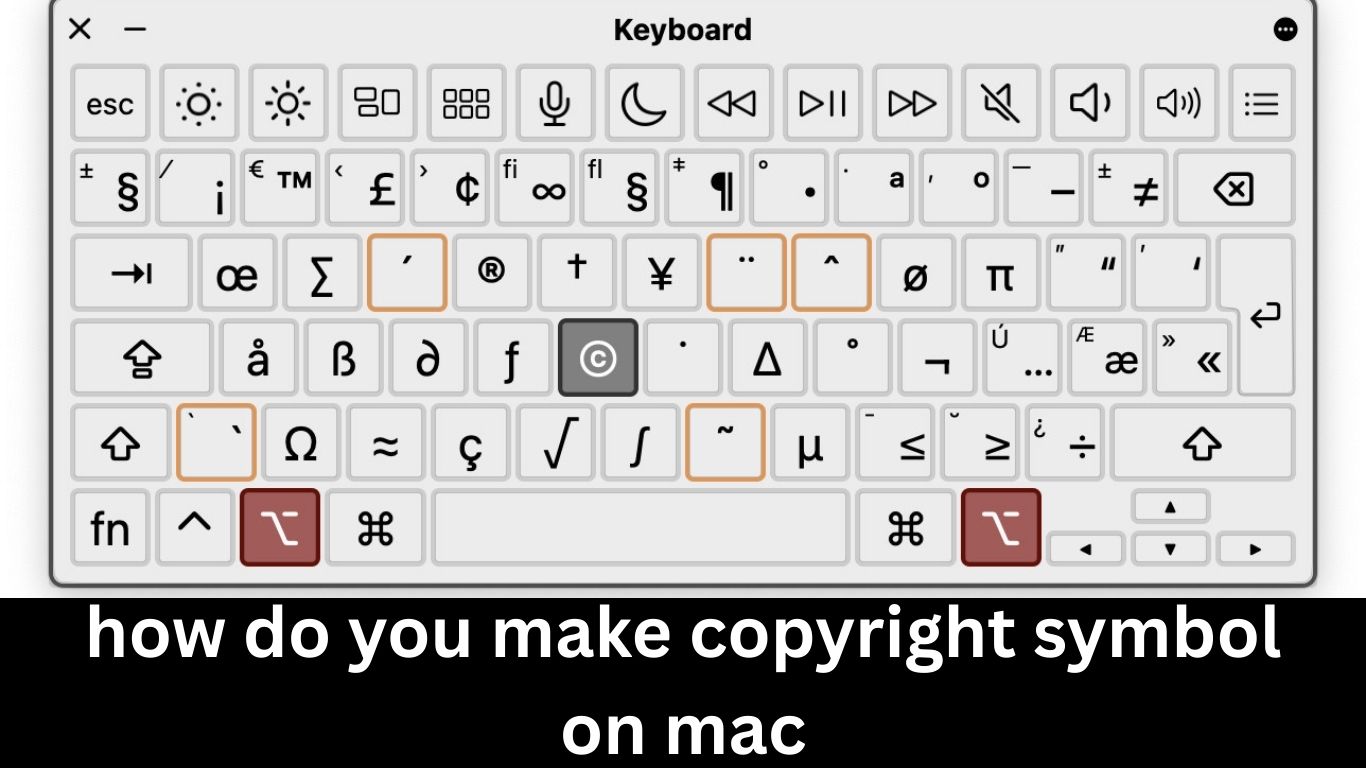
How do You Make copyright Symbol on Mac
Have you ever found yourself in a situation where you need to use the copyright symbol but can’t remember how to generate it on your Mac? You’re not alone! The copyright symbol is more than just a fancy character; it’s an important aspect of protecting creative work. Whether you’re working on a paper, a presentation, or even coding, knowing how to insert this little icon can save you time and keep your project looking professional. Let’s dive into various methods for how do you make copyright symbol on mac so you’ll never be left searching again.
Understanding Copyright and its Symbol
Copyright is a legal term that grants creators rights over their original works. This includes everything from literature and music to art and software. It ensures that others cannot use or reproduce your creations without permission.
The copyright symbol—©—serves as a visual reminder of these protections. When you see this symbol, it indicates that the work is protected by copyright law, signaling to others that they should not infringe on those rights.
This simple yet powerful character plays a crucial role in safeguarding intellectual property. By including it with your work, you assert ownership and discourage unauthorized use. Understanding its significance can empower creators while promoting respect for originality in various fields.
Making the Copyright Symbol on Mac Using Shortcut Keys
If you’re a Mac user, creating the copyright symbol is quick and easy with shortcut keys. This method saves time and keeps your workflow smooth.
Simply hold down the “Option” key. While holding it, press the letter “G.” Voilà! You’ve just inserted the © symbol into your document or text field.
It’s a handy trick to remember, especially for writers, artists, or anyone who frequently deals with intellectual property issues. No fumbling through menus—just a simple keystroke combination.
Try practicing this shortcut in different apps until it becomes second nature. It’s one of those little tips that can make a big difference in your daily tasks on a Mac.
Using the Character Viewer to Insert the Copyright Symbol
If you prefer a visual method, using the Character Viewer on your Mac is a simple solution. This tool provides access to various symbols and characters, including the copyright symbol.
Begin by placing your cursor where you want to insert the copyright symbol. Next, press “Control + Command + Space” simultaneously. This shortcut opens the Character Viewer window.
From there, locate the search bar at the top of the viewer. Type “copyright” to filter results quickly. You’ll see numerous options pop up, including different styles of the copyright symbol.
Just click on it once, and voilà! The symbol will appear right in your document or text field. It’s an efficient way for those who might not remember keyboard shortcuts but still want easy access to special characters.
Creating a Custom Keyboard Shortcut for the Copyright Symbol
Creating a custom keyboard shortcut for how do you make copyright symbol on mac can streamline your workflow. It’s an efficient way to access symbols you frequently use without fumbling through menus.
Start by navigating to System Preferences, then click on Keyboard. From there, head over to the Shortcuts tab. You’ll want to select “App Shortcuts” and hit the plus button to add a new one.
In the dialog box that appears, choose “All Applications” from the drop-down menu. For Menu Title, simply type in “Copyright,” or paste © if that works better for you. Assign your preferred keyboard combination—something memorable yet unique will help.
Now whenever you’re typing away and need that symbol, just press your chosen keys and voilà! You’ll have instant access without any interruptions in your creative flow.
Third-Party Apps for Inserting the Copyright Symbol
If you find yourself frequently needing the copyright symbol, third-party apps can be a game-changer. These tools often allow for more flexibility and customization than standard keyboard shortcuts.
Apps like TextExpander let you create snippets that automatically expand into symbols or phrases, including the copyright sign. With just a few keystrokes, you can insert it anywhere in your text.
Another useful option is Character Map from the Mac App Store. This app organizes special characters visually, making it easy to locate and insert various symbols, including ©. (how do you make copyright symbol on mac)
For those who prefer writing within specific applications, check if they offer plugins or extensions designed to enhance text editing capabilities. Many of these third-party solutions streamline the process of inserting special characters while improving overall productivity.
Tips and Tricks for Using the Copyright Symbol on Mac
Using the copyright symbol effectively can enhance your documents and presentations. First, always remember to check the font compatibility. Not all fonts display special characters equally well.
You can also integrate the copyright symbol into templates or frequently used documents. This saves time when you need it most.
Another handy tip is to create a snippet in text expansion apps. These tools allow you to insert symbols quickly by typing just a few characters.
If you’re working on design projects, consider layering the copyright symbol subtly within graphics. This adds an extra layer of professionalism without being intrusive.
Keep your keyboard shortcuts handy for quick access during creative sessions. Familiarize yourself with them so they become second nature as you work on various tasks!
Conclusion
Knowing how do you make copyright symbol on mac can enhance your writing and protect your creative work. There are multiple methods available, whether you prefer using shortcut keys or accessing the Character Viewer. Custom keyboard shortcuts offer a personalized touch, while third-party apps can provide even more flexibility.
Remember that using the copyright symbol correctly not only adds professionalism to your documents but also signifies respect for intellectual property rights. With these options at your disposal, you’ll find it easy to incorporate this important symbol into all of your digital content. Whether you’re drafting an email, creating marketing materials, or working on academic papers, being able to insert the copyright symbol effortlessly is a valuable skill in today’s digital age.













Leave a comment